
Builder Tasklist Now Speaks Spanish: A Faster, Clearer, Bilingual Jobsite Workflow
Builders work in a multilingual world. Subs, crews, and vendors regularly communicate in both English and Spanish, and most tools on the market still force teams to operate in one language. That slows everyone down and introduces mistakes.
Today, Builder Tasklist closes that gap.
Our latest update adds full Spanish localization, automatic translation for dictated and typed content, and bilingual visibility for tasks, trades, preferences, and share reports. No workarounds. No copy/paste into Google Translate. Just clear, practical communication designed for real jobsites.
This is a major step in helping small and mid-sized builders run tighter, more accurate field operations—without bulky software or extra admin steps.
Why Spanish Support Matters for Builders
A significant portion of American trades workers are primarily Spanish-speaking. In fact, according to the American Community Survey from the U.S. Census Bureau, about 31.1% of the U.S. construction industry workforce is Hispanic. Given that over 80% of Hispanic construction workers speak a language other than English at home, this implies roughly 3 million tradespeople nationwide use Spanish as their primary language.
Miscommunication around tasks, materials, sequencing, or punch lists costs real money: missed inspections, rework, delays, callbacks.
Builder Tasklist already eliminated the chaos around handwritten notes and unclear texts. Now we eliminate the language barrier, too.
1. All UI Elements Are Fully Localized to Spanish
Builder Tasklist now adapts itself automatically based on the user’s preferred language. If your phone is set to Spanish, every UI element in the app appears naturally in Spanish:
Buttons
Menus
Fields
Settings
Dictation screen and talk-to-task actions
Filters, smart lists, job lists, and more
The full interface is clean, clear, and user-friendly.
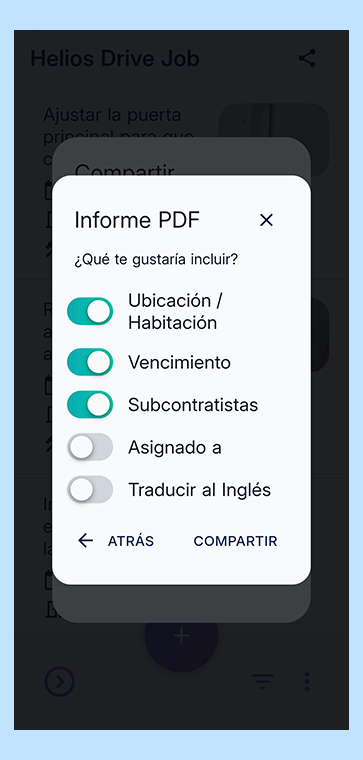
Spanish language interface of the Builder Tasklist mobile app showing PDF report settings, including options for location, due date, and a toggle to translate the report to English.
2. Dictated, Typed, or Shared Content Automatically Translates Between English and Spanish
This is the real breakthrough.
“When you dictate a task in English, the recipient can view it in Spanish.
When a Spanish-speaking team member dictates a task, you can view it in English.”
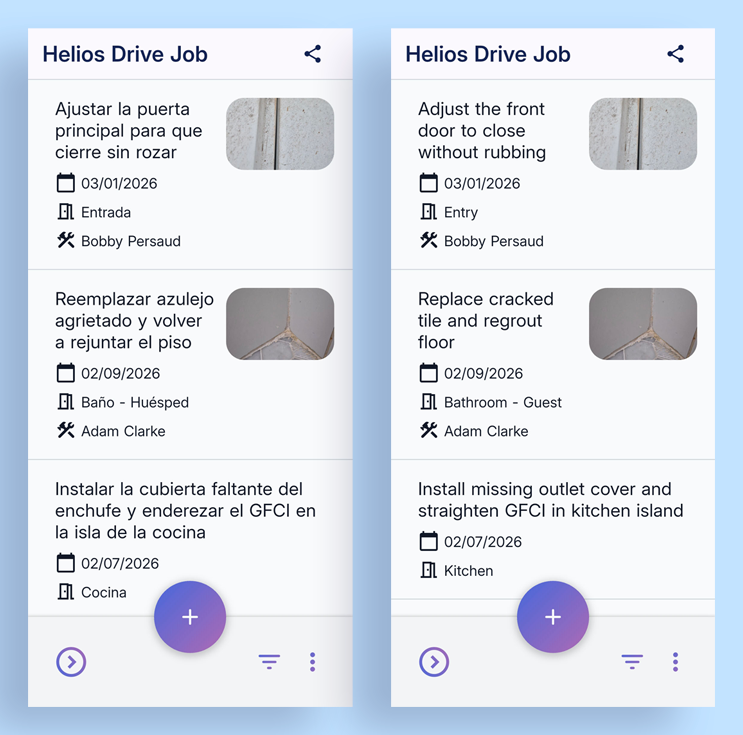
Side-by-side comparison of the Builder Tasklist mobile app interface in Spanish and English, showing synchronized jobsite tasks
No toggling. No extra steps. The Builder Tasklist AI handles it in the background.
This includes:
Dictated tasks
Typed tasks
Shared reports
Photo-attached tasks with descriptions
Notes
Trades and vendor references
If it’s generated by a user, we translate it.
If it’s created in Spanish, we automatically produce an English version—and vice versa.
3. Tasks, Trades, Preferences, and Share Reports Are All Viewable in English or Spanish
All core field-level elements are now bilingual:
Tasks: View any task in either language.
Trades: “Electrician,” “Plumber,” “Framer,” etc., all mapped and translated.
User Preferences: Notification preferences, communication settings, etc.
Export & Share Reports: Email, text message, CSV, and PDF exports can be viewed in either language by the recipient.
This solves a major industry problem: bilingual or multilingual jobsite communication that’s clean, consistent, and instant.
Subs don’t need the app. They don’t need to install anything. They receive the task lists in their preferred language.
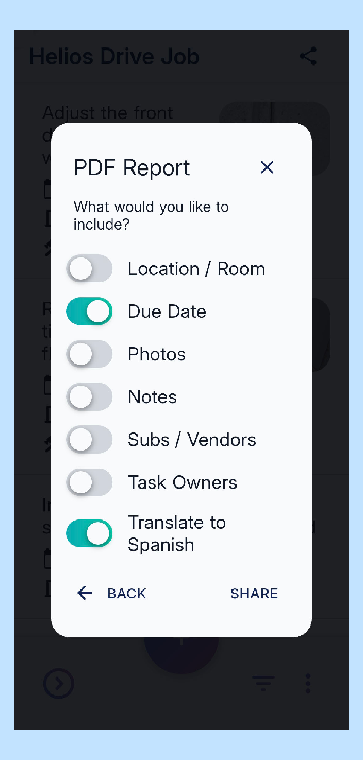
User interface of the Builder Tasklist app showing PDF report export settings with a toggle enabled for "Translate to Spanish" to generate bilingual jobsite punch lists.
What This Means for Builders, Supers, and Subs
Less Miscommunication
The number one source of punch list delays and rework is unclear instructions. Bilingual tasks fix that.
Faster Field Walkthroughs
Talk into the app once. Everyone sees the task in their own language.
Better Sub/Vendor Coordination
Subs get clear instructions with photos, formatted the way they prefer—no app download required.
A More Professional Client Experience
Homeowners get clean, polished, bilingual reports for walkthroughs, warranty calls, and inspections.
Real-World Example
Our staff General Contractor tested this during an electrical punch list walkthrough.
He dictated in English:
“Electrician needs to add a nail plate behind the laundry room outlet before inspection.”
The electrician viewed it instantly in Spanish:
“El electricista debe agregar una placa de clavos detrás del tomacorriente del cuarto de lavado antes de la inspección.”
No follow-up. No confusion. Just work getting done.