
Builder Tasklist v1.2.1 Release Update: Your reports just got a lot more professional
Builder Tasklist v1.2.1 — Reporting Updates
When you hand a homeowner a progress report or send a punch list to your plumber, that document says something about how you run your jobs. It should look sharp, be easy to reference, and make it clear who's responsible for what.
That's the idea behind v1.2.1. We took the reporting features builders already use every day and made them better in four specific ways.
Name Your Reports Before You Share Them
Previously, exporting a PDF report went straight from selecting your criteria to sharing. Now there's a naming step in between. After you pick what to include, tap Next and you'll see a text field with a default name — "Task Overview Report" or "Task Details Report." Accept the default or type something specific like "412 Elm St — Punch List March 2026."
The name you enter appears as the title at the top of the PDF. When it lands in someone's inbox, they know exactly what they're looking at without opening it.
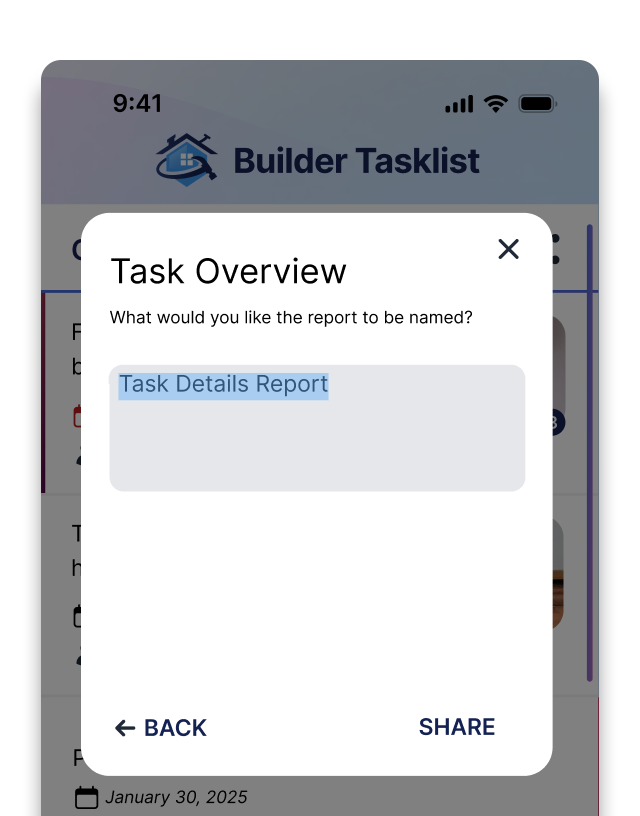
Name your report before exporting in the new Builder Tasklist v1.2.1 release.
Every Task Is Numbered
Tasks in your PDF reports are now numbered sequentially — 1, 2, 3 — with a total count at the top of the report. This makes it easy to reference specific items when you're on the phone with a sub or walking a job with a homeowner. "Look at task 14" is a lot faster than "the one about the trim in the master."
Assignees Show Name and Company
When a task is assigned to a sub or vendor with a company on file, the report now shows both: "Danny Martinez - Summit Plumbing." No more guessing which Mike or which plumbing company is handling what. This applies to PDF reports and copied text exports. If the assignee doesn't have a company record, just their name appears — nothing changes for you there.
Cleaner Photo Layout in Detail Reports
If you use the Task Details report with photos, you'll notice the pages are cleaner now. Each task's description and its first photo stay together on the same page. When a task has multiple photos that span pages, the extra photos continue on the next page without repeating the task description or leaving big gaps of white space. The result is a report that looks polished, not thrown together.
A Few More Fixes
We also cleaned up some things under the hood:
Spanish dictation no longer pre-fills the notes field with "sin notas"
The user access toast now shows the correct text instead of a localization key
The share type label displays in the correct language for Spanish users
The Homeowner Picker shows an empty state with a quick-add option when no homeowners exist on the job
Update Now
v1.2.1 is available now on the App Store and Google Play. All of these improvements are included automatically — no settings to change, nothing to turn on.
Questions? Reach us anytime at support@buildertasklist.com